What is RAG?
RAG (Retrieval-Augmented Generation) is how you give an AI access to your own data. Instead of guessing answers, the AI first searches your documents, finds the relevant parts, and then generates an answer based on what it found.
The problem? Getting your data into a searchable format is painful. You need to extract text, chunk it, embed it into numbers, store in a vector database, and search. RAGPipe does all of this in one pipeline.
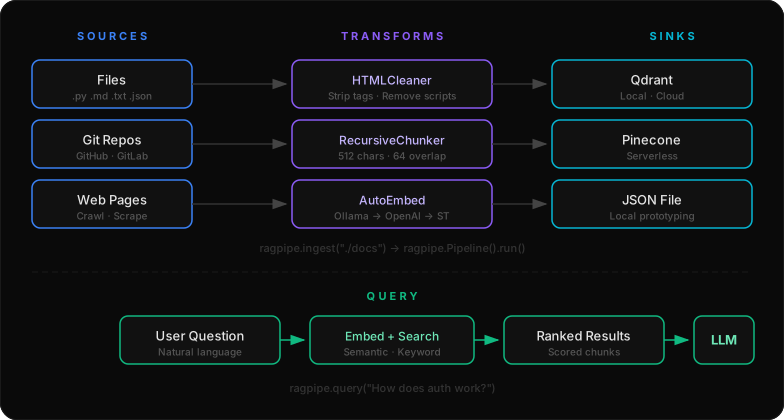
The 3 Functions
CLI
Why RAGPipe?
3 Functions
ingest(), query(), pipe() — the entire API. Like Chroma's "4 functions" for RAG pipelines.
Zero Config
Auto-detects files, auto-embeds with whatever you have installed. Ollama → OpenAI → sentence-transformers.
YAML Pipelines
Declarative configs like docker-compose for RAG. Version control your ingestion pipelines.
Beautiful CLI
Rich progress bars, result tables, and status spinners. Built with Typer + Rich.
Any Source
Local files, git repositories, web pages with crawling — one interface for everything.
Any Vector DB
Qdrant, Pinecone, or just a JSON file for local development. Swap with one argument.
YAML Pipelines
Define your entire RAG pipeline in a YAML file:
ragpipe run pipeline.yaml
Sources
| Source | Description |
|---|---|
FileSource | Local files and directories — auto-detects text files |
GitSource | Clone git repos (GitHub, GitLab, any git server) |
WebSource | Scrape web pages with optional depth crawling |
Transforms
| Transform | Description |
|---|---|
RecursiveChunker | Split text using hierarchical separators (paragraphs → sentences → words) |
FixedSizeChunker | Split by fixed character count with overlap |
SemanticChunker | Split by semantic similarity of sentences |
HTMLCleaner | Strip HTML to clean text, remove scripts/styles |
PIIRemover | Redact emails, phones, SSN, credit cards, IPs |
AutoEmbed | Zero-config embeddings — auto-detects Ollama, OpenAI, sentence-transformers |
Sinks
| Sink | Description |
|---|---|
JSONSink | Write to a local JSON file — great for prototyping |
QdrantSink | Write to Qdrant vector database (local or cloud) |
PineconeSink | Write to Pinecone vector database |
Embedding Backends
AutoEmbed tries each backend in order and uses the first available:
| Priority | Backend | Setup |
|---|---|---|
| 1 | Ollama (local, free) | ollama pull nomic-embed-text |
| 2 | OpenAI | Set OPENAI_API_KEY |
| 3 | sentence-transformers (local, free) | pip install 'ragpipe-ai[local]' |
System Integrations
Smart Index
ragpipe index . — auto-detects language, ignores node_modules/.git, chunks and stores.
File Watcher
ragpipe watch . — auto-reindexes on every file change. Uses watchdog.
REST API
ragpipe serve — local API with /search, /health, /chunks, /reindex on port 7642.
Git Hooks
ragpipe git hook . — auto-index after every commit. Invisible, zero-friction.
VSCode
ragpipe vscode tasks . — generates tasks.json with Index/Query/Serve/Watch tasks.
fzf
ragpipe search --fzf — interactive fuzzy search through your indexed data.
macOS Spotlight
ragpipe macos spotlight "query" — search via native mdfind.
Linux systemd
ragpipe linux service --install — run as a systemd service. Scheduled indexing with timers.